
Typing Speed Test
Check your typing speed (WPM) and accuracy in 15 to 120 seconds, then train the keys you miss most. Free, no account, results stay in your browser.
Start typing to begin — the timer starts with your first key. · Tab then Enter: restart · Esc: new text
Your recent results
No results yet.
Results are saved in this browser only. The text you type is never sent anywhere.
How to take the test
- Choose a length: a time (15 to 120 seconds) or a number of words (25, 50, 100). “Accuracy” has no timer; “Numbers & code” trains symbols; “My text” lets you paste your own.
- Click the text (or tap it on a phone) and start typing. The timer starts with your first key.
- Correct letters turn dark, mistakes turn red, the blue bar shows where you are. In word modes the counter shows how many words are done.
- The test stops at the end of the time or of the text. Press Restart for the same text, New text for another one, or Esc.
📱 On a phone the text box shows three lines and scrolls by itself as you type: the next words appear as you go. Turn off auto-correction if your keyboard changes words.
How to read your results
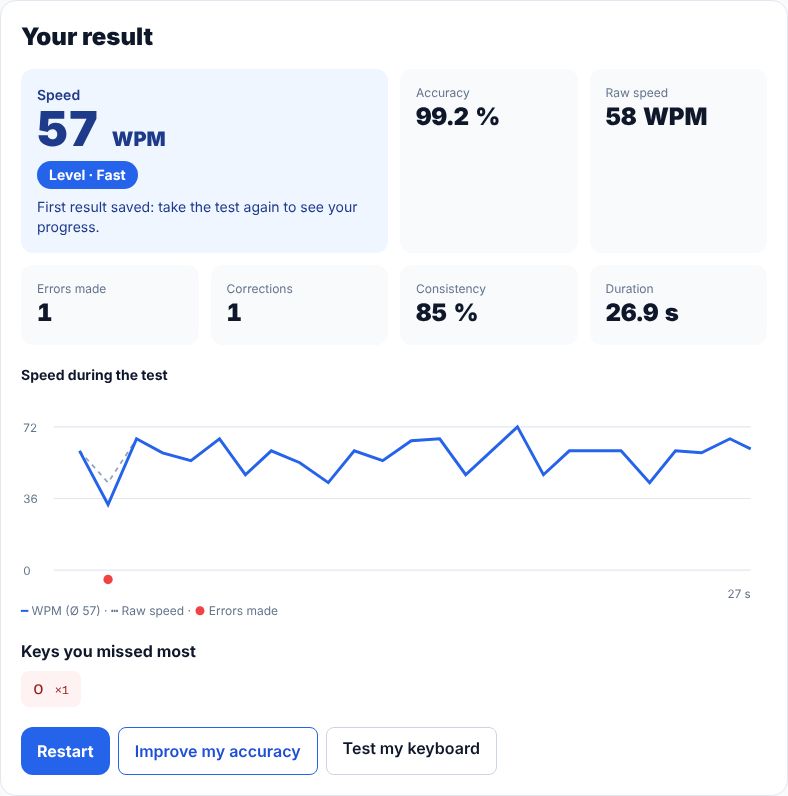
- Speed
- Your real speed: correct characters ÷ 5 per minute (WPM). Mistakes you left in the text do not count.
- Level
- Beginner, Intermediate, Fast or Expert, from your speed; one level lower if accuracy is under 90 %.
- Accuracy
- Share of characters typed right the first time. Aim for 95 % or more before trying to go faster.
- Raw speed
- Everything you typed, right or wrong. A big gap with your speed means you lose time on mistakes.
- Errors made
- Wrong characters typed, even if you fixed them afterwards.
- Corrections
- Characters you deleted (Backspace). Many corrections slow you down more than you think.
- Consistency
- How steady your speed was second by second (100 % = perfectly regular). Shown from 5 seconds of typing.
- Speed during the test
- Your speed each second (solid line), the raw speed (dashed) and the seconds with mistakes (red dots).
- Keys you missed most
- The characters you missed most. “Improve my accuracy” builds an exercise with them.
- Your recent results
- Your recent results, saved in this browser only, compared with your average and personal best.
About this typing test
WPM counts correct characters ÷ 5 per minute; raw WPM counts every character typed. Accuracy is the share of characters typed without error, so fixing a typo costs time but is not counted twice. Text being composed by an input method (IME) is never counted as an error.
- What is a good typing speed?
- Most people type 35–45 WPM. 60 WPM is comfortable for office work, and 80 WPM or more is fast. Accuracy matters as much as speed: below about 95 % you lose more time fixing mistakes than you gain.
- How is WPM calculated?
- A “word” is 5 characters, spaces included. WPM is the number of correct characters divided by 5, per minute. Raw WPM counts every character you typed, right or wrong.
- Do corrections lower my score?
- A corrected typo costs the time you spent fixing it, and it still counts once in your accuracy, but it is not counted again in your final speed. Uncorrected mistakes do not count as correct characters.
- How do I get faster?
- Train accuracy first: type slowly enough to make almost no mistakes, keep your fingers on the home row (F and J have a bump) and look at the screen, not the keyboard. Use “Improve my accuracy” after a test to practise the keys you miss most.